
BugFlows Process
Bugflows Defect Triage Workflow
Transparent, audit-ready MLaaS workflows from registration and ingest to prediction and review.
From registration to prediction, Bugflows is designed to help teams make more consistent triage decisions with operational visibility, auditability, and deployment flexibility.
Transparent steps
Bugflows lets customers train models on historical defect data and generate predictions that support triage, routing, and resolution planning. Every plan follows the same core steps: register, ingest data, train, predict, govern, and retain. This page walks through that end-to-end product workflow and highlights where plans differ.
No matter your plan, Bugflows emphasizes privacy, secure storage, asynchronous processing, and clear APIs so teams can build repeatable MLaaS workflows with confidence.
Pipeline Snapshot
Demo
Free tier, Bugflows-managed GCS, CSV uploads.
Cloud Hosted
Production-ready credits & Bugflows automation.
Hybrid Cloud
Your GCP/AWS via OAuth; zero fallback to Bugflows.
Enterprise
Custom flows—Cloud Hosted or Hybrid per contract.
Pipeline Diagram
Annotated workflow from data ingest to prediction.
A visual map of the Bugflows pipeline so engineering teams understand exactly where data is stored, trained, and served.

Prediction example with confidence scores and recommended assignees.
Pipeline detail
Eight stages, on demand
Expand any stage to view the technical flow. Collapsed by default to keep the page scannable.
Kick off through the Bugflows identity service
Create an account, verify your email and receive a default organization called “Demo Inc.” via the /verify_email_and_generate_otp and /signup endpoints. The system designates a plan (Demo or Free) and initial credits so you can start experimenting immediately.
- Plan-aware onboarding. Paid plans can upgrade later via
/plansand/payments; you can invite teammates during activation. - Data residency by plan. Demo & Cloud Hosted plans store data in Bugflows-managed Google Cloud Storage. Hybrid Cloud mandates connecting your GCP/AWS project through OAuth before training or prediction, and the backend blocks other plans from starting those flows.
- Enterprise flexibility. Enterprise Cloud mirrors either Cloud Hosted or Hybrid depending on the contract.

| Plan level | Plan name |
|---|---|
| 0 | Demo Plan (free tier) |
| 1 | Cloud Hosted (Bugflows cloud) |
| 2 | Hybrid Cloud (user-managed cloud) |
| 3 | Enterprise Cloud (custom) |

Bring the signals that matter
Bugflows supports CSV uploads and live connectors so you can aggregate defect history exactly the way you need. Each job stores raw files in gs://{bucket}/executions/version_{version_id}/input_data/raw_data/, whether the bucket lives in Bugflows GCS (Demo & Cloud Hosted) or your own project (Hybrid).
CSV upload (manual)
Use /train with multipart CSVs and the is_anon header to decide whether Bugflows anonymizes PII.
- Backend validates at least one CSV
- Checks plan eligibility & OAuth state
- Hybrid without cloud connection returns HTTP 400
Direct connector fetch
Connect Jira or YouTrack via /jobs/training/connections with connection_type and filters such as JQL.
- Backend proxies to provider and generates CSVs
- Available on paid plans
- Artifacts stored in your designated storage tier
API-driven control plane
Bugflows orchestrates training through hardened backend services. Once the frontend calls /train or /jobs/training/connections, the workflow below keeps everything synchronized.
- Job submission. Session verification, plan checks, file headers (including
is_anon) and credit quota enforcement happen before the request enters the queue. - Bucket management. Bugflows creates or validates buckets, uploads raw CSVs and copies ML configuration files into
Params/. - Job orchestration. Metadata lands in PostgreSQL and each job is enqueued to an available ML host. Bugflows invokes the ML backend with
POST /traincontainingtraining_job_id, bucket_name,version_id,is_anon, tokens, OAuth/service-account credentials and thefinish_api_address. - Status polling. Users get a
training_job_idimmediately and can poll/status_trainingor the dashboard for Queued → Processing → Success/Failed updates driven by callbacks.


Deterministic training steps across every plan
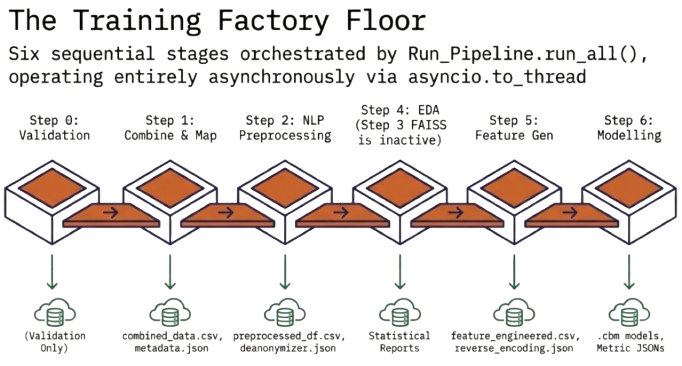
Once the ML backend receives POST /train, it spins up a background thread that executes a consistent pipeline while respecting your storage and auth choices.
Load & validate
Read raw CSVs from GCS, detect source types, halt on schema issues.
Combine & map
Merge CSVs into combined_data_{token}.csv and standardize columns (mapped_data_{token}.csv).
Metadata capture
Persist metadata.json with source_type, is_anon and the unique token.
Preprocess & anonymize
Clean text, create preprocessed_df_{token}.csv and deanonymizer_{token}.json when needed.
EDA & features
Generate EDA artifacts (eda_data/) and feature-engineered datasets per label with reverse encoding maps.
Model training
Train CatBoost models per target, storing .cbm files inside output_data/catboost_model_storage.
Completion & callback
Post to finish_api_address with status, description and error payloads.
Serve intelligent recommendations at scale
When a model is ready (status = Success), switch to inference with the same asynchronous design.
- Prepare input. Select a trained
training_job_id, submitPOST /predict(Demo & Cloud Hosted) or/jobs/prediction(Hybrid/Enterprise) with therequest_string. - Job creation & dispatch. Backend enqueues the request, chooses an ML host, then calls the ML backend with
bucket_name, modelversion_id,prediction_job_id, token,request_string, cloud credentials and a callback URL. You immediately get aprediction_job_idand can poll/status_prediction. - Model loading & inference. ML backend loads
metadata.json, configuration, deanonymizer maps, encoding maps and.cbmmodels before computing probabilities and human-friendly labels. - Callback & retrieval. The ML backend posts
prediction_job_id, prediction payloads, status and errors to/finish_prediction; the platform stores them for dashboard and API retrieval.


Privacy-first controls
Anonymization control
Choose is_anon per upload. True redacts PII and skips deanonymizer maps; false stores deanonymizer_{token}.json for reversible predictions.
User-controlled storage
Hybrid users authorize cloud accounts via OAuth, and every artifact—raw data, intermediate files, models—stays in their environment.
Role-based access & quotas
Bugflows enforces session validation, job quotas and credit limits. Only authorized users can view or delete jobs, and deletions trigger removal of artifacts per retention policies.
Data retention & audit
Use /me/data to inspect UploadedFiles, TrainedModels, Predictions, LogsHistory and Connectors. metadata.json plus structured artifact paths provide compliance-ready traceability.
How tiers handle storage, authentication and quotas
| Step | Demo & Cloud Hosted (0–1) | Hybrid Cloud (2) |
|---|---|---|
| Storage | Bugflows-managed GCS with lifecycle policies enforced by the Backend API. | User-managed GCP/AWS. OAuth required and no fallback to Bugflows credentials. |
| Training input | CSV upload or Jira/YouTrack connectors. Demo plan enforces file-size limits. | Same input options, but raw data moves directly into the customer’s bucket. |
| Auth to ML backend | Bugflows service account for GCS operations. | OAuth-generated credentials with auth_type = oauth / aws_oauth. |
| Job quotas & credits | Demo = free credits & limits, Cloud Hosted = paid quotas per billing cycle. | Quotas similar to Cloud Hosted but billed per job with hybrid pricing. |
| Data retention | Stored in Bugflows GCS. Delete via dashboard; default retention policies apply. | Resides entirely in your cloud with deletion under your control. |
Designed for transparency, speed and growth
Asynchronous processing
Training and prediction jobs are non-blocking. APIs return IDs immediately so teams can keep working while ML hosts execute and update via callbacks.
Exploratory data analysis
Every training run produces EDA summaries inside your bucket or dashboard, helping you understand label balance and text distributions before deploying models.
Upgrade paths
Start with Demo to explore the pipeline, then upgrade via /plans for larger jobs, hybrid cloud support and enterprise-scale governance.
Ready to modernize your defect pipeline?
Bugflows unites ingest, training, inference and retention so your engineering teams can move faster with confidence.
- Transparent orchestration: Plan-aware APIs, callbacks and dashboards keep every job auditable.
- Hybrid storage choice: Use Bugflows-managed GCS or your own GCP/AWS buckets with OAuth.
- ML assets that travel with you: Versioned metadata, EDA, and CatBoost artifacts stay accessible for future predictions.